


Bookkeeping for self-employed professionals is the single most important financial habit you can build. After helping independent business owners manage their money for over a decade, I can tell you that bookkeeping for self employed individuals is what separates those who thrive from those who scramble at tax time. The good news? In 2026, modern software handles most of the heavy lifting automatically. This step-by-step guide walks you through everything you need to set up a bookkeeping system, track income and expenses, maximize deductions, and understand exactly how profitable your business really is.
Why bookkeeping for self-employed professionals matters
Bookkeeping is the foundation of every healthy self-employed operation. It means tracking every dollar flowing in and out of your business so you can answer critical questions at any time: Am I actually profitable? Which clients or projects generate the most value? How much do I need to set aside for quarterly taxes? What deductions am I missing?
Without proper bookkeeping, self-employed individuals often face costly surprises at tax time, miss deductions worth thousands of dollars, and struggle with cash flow because they cannot see their financial picture clearly. According to the IRS Self-Employed Tax Center, maintaining accurate financial records is not optional – it is a legal requirement for anyone earning self-employment income.
The difference between successful and struggling self-employed professionals almost always comes down to financial organization. When you know your numbers, you price your services correctly, plan for taxes confidently, and make smarter business decisions every day.
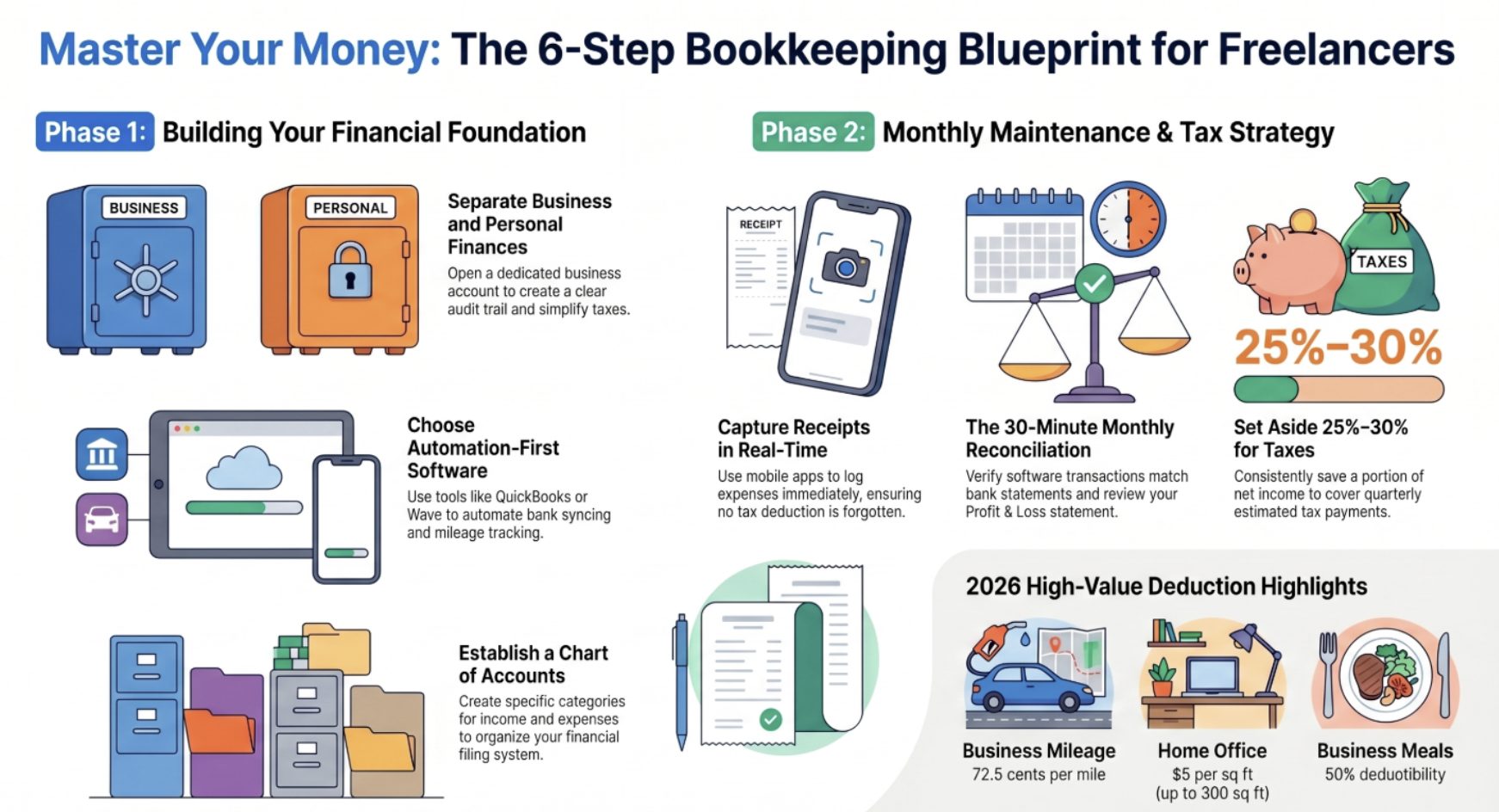
Step 1: separate business and personal finances
This is the single most important step, and it should be the first thing you do. Open a dedicated business bank account and route all business income and expenses through it. This separation serves multiple purposes: it dramatically simplifies tax preparation, protects your personal assets if your business faces legal issues, creates a clear audit trail that satisfies IRS recordkeeping requirements, and makes it obvious at a glance how much cash the business actually has.
When business and personal money mix together, every transaction becomes confusing at tax time. Was that $100 charge groceries or a business meal? Is the electric bill personal or home office? A separate business account removes all this ambiguity and saves you hours of sorting later. Most business checking accounts are free or low-cost – there is no reason not to do this immediately.
Step 2: choose the right bookkeeping software
The software you select determines how much time you spend on bookkeeping each week. Here is how the top options for self-employed professionals compare in 2026:
QuickBooks Self-Employed remains the top choice for freelancers and independent contractors. It offers automatic transaction categorization, mileage tracking, quarterly tax estimates, and seamless integration with TurboTax. Plans start at $15 per month. QuickBooks has been named the leading bookkeeping tool for self-employed professionals for its automation and real-time financial insights.
Wave is the best free option, offering unlimited invoicing, receipt scanning, and financial reporting at no cost. Paid features like payroll and payment processing start at $16 per month. Wave is ideal for freelancers who want basic bookkeeping without a subscription.
FreshBooks excels at invoicing and time tracking, making it a strong fit for service-based freelancers who bill by the hour. Plans start at $19 per month and include expense tracking, project profitability reports, and double-entry accounting.
Xero provides real-time bank feeds and an intuitive dashboard for tracking cash flow. It is particularly good for self-employed professionals with multiple income streams or international clients. Plans start at $15 per month.
When evaluating software, prioritize automatic bank syncing, expense categorization, invoice generation, tax-ready reporting, and receipt capture via mobile app. Also consider whether the software scales as your business grows – switching platforms later means migrating all your data.
Step 3: set up your chart of accounts
Before entering any transactions, establish your chart of accounts. This is simply a list of categories for organizing your income and expenses. Think of it as the filing system for your financial life. For a freelance consultant, categories might include consulting income, software subscriptions, home office expenses, marketing costs, professional development, travel, and equipment.
Your bookkeeping software provides templates you can customize, so you do not need to build this from scratch. The key is being specific enough to identify deductible expenses at tax time, but not so granular that categorizing transactions becomes a chore. Most modern software learns your spending patterns over time and auto-categorizes recurring transactions using AI.
Step 4: track all income sources
Every dollar your business earns must be recorded. This includes client payments, product sales, affiliate commissions, interest income, and any other revenue. Issue professional invoices promptly for all services – a good invoice includes your business name and contact information, a clear description of work completed, payment amount and terms (Net 30 is standard), and your accepted payment methods.
Connect your business bank account to your bookkeeping software so deposits automatically match against invoices. Log income as soon as payment hits your account. Over time, you will spot patterns – like which clients pay late or which months are seasonally slow – that help you manage cash flow more effectively.
If you earn income from multiple platforms or clients, reconcile everything monthly. Self-employed individuals who receive more than $600 from any single client will get a 1099-NEC form – make sure your records match what gets reported to the IRS.
Step 5: manage expenses and maximize deductions
Proper expense tracking is where bookkeeping for self employed professionals directly saves money. Every legitimate business expense reduces your taxable income. Common deductible categories include:
Office supplies, software, and subscriptions. Professional equipment and tools. Home office expenses – you can deduct a percentage of rent, utilities, and insurance based on the square footage dedicated to your workspace, or use the simplified method at $5 per square foot up to 300 square feet. Business mileage at the IRS standard rate of 72.5 cents per mile for 2026. Health insurance premiums if you are not eligible for employer-sponsored coverage. Advertising, marketing, and website costs. Professional development, courses, and certifications. Business meals at 50 percent deductibility. Contractor and freelancer payments.
Capture receipts immediately using your software’s mobile app. Most platforms extract the date, vendor, amount, and category automatically from a photo. Do not wait until year-end to organize receipts – the habit of logging expenses in real time is what separates accurate bookkeeping from stressful guesswork.
Step 6: build a monthly bookkeeping routine
A consistent monthly rhythm prevents financial information from piling up into an overwhelming backlog. At the end of each month, follow this checklist:
Reconcile your bank accounts by verifying that transactions in your software match your actual bank statements. Review and categorize any uncategorized expenses. Send outstanding invoices and follow up on overdue payments – many self-employed professionals lose thousands annually simply by not chasing late invoices. Review your profit and loss statement to see how revenue compared to expenses. Set aside money for taxes in a separate savings account.
This entire routine should take 30 to 60 minutes once you have a system in place. The monthly P&L review is especially valuable because it shows you trends over time – whether your income is growing, which expense categories are creeping up, and whether your pricing is generating enough profit margin.
Self-employment tax essentials for bookkeepers
Understanding your tax obligations is a critical part of bookkeeping for self employed individuals. Unlike W-2 employees, you must pay both the employer and employee portions of Social Security and Medicare taxes. For 2026, the self-employment tax rate is 15.3 percent on net earnings (12.4 percent for Social Security on the first $184,500, plus 2.9 percent for Medicare on all earnings). You can deduct the employer-equivalent portion (half) of self-employment tax when calculating your adjusted gross income.
On top of self-employment tax, you owe federal and potentially state income taxes. A reliable rule of thumb is to set aside 25 to 30 percent of net income for all taxes combined, though your state-specific self-employment tax rate may vary.
You must pay estimated taxes quarterly – due April 15, June 15, September 15, and January 15. Your bookkeeping software helps by showing year-to-date profit, making it straightforward to calculate each quarterly payment. Missing quarterly deadlines triggers IRS underpayment penalties, so build these dates into your calendar.
Commonly missed deductions that good bookkeeping catches include the home office deduction, health insurance premiums, half of self-employment tax, SEP-IRA or Solo 401(k) contributions, business use of phone and internet, and continuing education related to your field.
Common bookkeeping mistakes self-employed professionals make
After working with hundreds of self-employed clients, these are the errors I see most often:
Mixing personal and business finances. This is the number one mistake and leads to missed deductions, messy tax filings, and potential audit risk. Always maintain a separate business account.
Waiting until tax season to do bookkeeping. Trying to reconstruct a year of transactions in March is stressful, error-prone, and almost guarantees you will miss deductions. Monthly bookkeeping takes minutes; annual catch-up takes days.
Forgetting to track cash transactions. If you receive any income in cash or pay for supplies with cash, it still needs to be recorded. The IRS expects you to report all income, not just what shows up in your bank account.
Not backing up financial records. Cloud-based bookkeeping software handles this automatically, but if you keep any records locally, maintain backups. The IRS recommends keeping tax records for at least three years, and up to seven years for certain claims.
Overlooking quarterly estimated tax payments. Underpayment penalties add up quickly. Set calendar reminders and automate transfers to a tax savings account each month.
When to hire a professional bookkeeper
Most self-employed individuals can handle their own bookkeeping using modern software. However, consider hiring professional help if your business grows complex – multiple income streams, employees, inventory, or international transactions. A professional bookkeeper typically charges $300 to $2,000 per month depending on complexity and location.
You should also consult a CPA or tax professional at least once per year to review your books, ensure you are categorizing deductions correctly, and identify tax-saving strategies you might be missing. According to the Small Business Administration, working with a financial professional can help self-employed individuals avoid costly errors and plan for long-term growth.
The decision to hire help usually comes down to opportunity cost: if you are spending 5 or more hours per month on bookkeeping and your billable rate is higher than what a bookkeeper charges, outsourcing is the financially smarter choice.
Frequently asked questions
What is the first step in bookkeeping for self employed individuals?
Open a separate business bank account immediately. This single step keeps business and personal finances apart, making tax preparation dramatically simpler and creating a clear audit trail. Route all business income and expenses through this account from day one.
How often should self-employed professionals update their bookkeeping?
Update your records weekly or whenever you receive income or pay business expenses. At minimum, perform a thorough monthly reconciliation. Modern bookkeeping software syncs automatically with your bank account, so most transactions update themselves – you just need to review and categorize them.
What is the best bookkeeping software for self-employed people?
QuickBooks Self-Employed is the top overall choice for its automation, tax integration, and mileage tracking. Wave is the best free option for basic bookkeeping needs. FreshBooks is ideal for service-based freelancers who need strong invoicing features. Choose based on your specific business needs and budget.
How much should self-employed individuals set aside for taxes?
Set aside 25 to 30 percent of your net income to cover self-employment tax (15.3 percent), federal income tax, and state income tax. Transfer this amount to a separate savings account each month so you are never caught off guard by quarterly estimated payments.
Can self-employed individuals deduct a home office?
Yes. You can deduct a percentage of your home expenses – including rent, utilities, insurance, and maintenance – based on the square footage of your workspace. The simplified method allows $5 per square foot up to a maximum of 300 square feet ($1,500 annual deduction). Keep documentation of your office space and related expenses.
What happens if I do not keep bookkeeping records?
Without accurate records, you will overpay taxes by missing legitimate deductions, face difficulties if audited by the IRS, struggle to understand your true profitability, and have trouble making informed pricing and growth decisions. The IRS requires self-employed individuals to maintain adequate records of all business income and expenses.


